Views: 19
Table of Contents
- 1 Why Udyam Registration Matters Before You Even Get to the “How”
- 2 Who Should Register, and What “MSME” Actually Means in 2026
- 3 Before You Start — What You Need Ready
- 4 Step-by-Step Udyam Registration Process
- 5 Migrating from the Old Udyog Aadhaar System
- 6 Common Mistakes to Avoid
- 7 Frequently Asked Questions
- 8 Why Choose LegalTax.in for Udyam and MSME Compliance
- 9 Get Expert Support
Why Udyam Registration Matters Before You Even Get to the “How”
A business does not need Udyam registration to legally operate in India. What it needs registration for is everything that makes growing easier — priority sector lending from banks, collateral-free credit guarantees, protection against delayed payments from buyers, access to government tenders reserved for MSMEs, and eligibility for a wide range of central and state government schemes.
The process itself, run entirely by the Ministry of MSME through the official portal, is free, paperless, and based on self-declaration rather than document uploads. That last point is worth emphasizing because it is also where a lot of confusion and a fair number of scams come from — several private websites charge a fee to “help” with a process that costs nothing on the actual government portal.
This guide walks through the real, current process step by step, along with the classification rules that determine what category your business falls into.
Who Should Register, and What “MSME” Actually Means in 2026
An MSME is classified based on two criteria considered together — investment in plant and machinery or equipment, and annual turnover. Both matter; neither alone determines your category.
As per the current government classification:
| Category | Investment Limit | Turnover Limit |
|---|---|---|
| Micro Enterprise | Up to Rs. 1 crore | Up to Rs. 5 crore |
| Small Enterprise | Up to Rs. 10 crore | Up to Rs. 50 crore |
| Medium Enterprise | Up to Rs. 50 crore | Up to Rs. 250 crore |
A few important rules around this classification:
Both criteria apply together. If a business crosses the ceiling in either investment or turnover, it moves up to the next category. It only moves back down to a lower category if it falls below both ceilings simultaneously — crossing just one threshold downward is not enough to reclassify to a lower tier.
All GST registrations under the same PAN are treated as one enterprise. If you have multiple GSTINs linked to a single PAN, their turnover and investment figures are aggregated together for classification purposes, rather than assessed separately.
This applies to manufacturing and service enterprises. Trading businesses have historically sat outside the core MSMED Act framework for Udyam purposes, though this is an area that has seen periodic policy discussion — confirm current applicability to trading activity on the official portal or with a professional before assuming either way for your specific business.
PAN and Aadhaar are mandatory. Aadhaar of the proprietor, managing partner, or karta (for an HUF) is required in all cases. For companies, LLPs, cooperative societies, trusts, and similar entities, the organization’s PAN and GSTIN must also be provided.
Because classification thresholds and related rules are periodically revised by government notification, always cross-check the current limits on udyamregistration.gov.in before relying on any figure, including the ones above, for a specific filing decision.
Before You Start — What You Need Ready
Although no documents are uploaded during the process itself, having the following ready and accurate makes the registration faster and reduces errors:
- Aadhaar number of the proprietor, managing partner, or karta
- Mobile number linked to that Aadhaar, for OTP verification
- PAN of the business or individual, as applicable to your entity type
- GSTIN, where applicable to your category of business under the CGST Act
- Basic business details — name, type of organization, official address, bank account details (account number and IFSC), and the National Industry Classification (NIC) code describing your main business activity
- An estimate of investment in plant and machinery/equipment and annual turnover, since this feeds into your classification (this is largely auto-fetched from linked PAN and GST data, but having your own figures ready helps you sanity-check what the system pulls in)
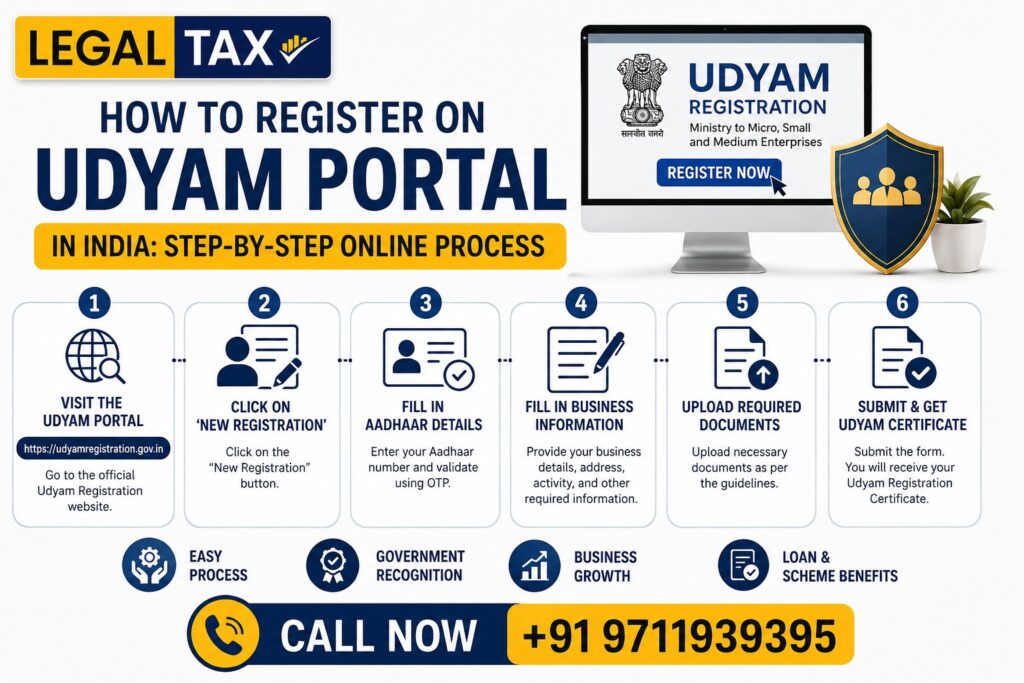
Step-by-Step Udyam Registration Process
Step 1 — Go to the Official Portal Only
Navigate directly to udyamregistration.gov.in. This is the only official government portal for Udyam registration. The portal itself carries an explicit warning that no other website, app, or private consultant is authorized to charge a fee for this process — registration is completely free.
If you have searched for “Udyam registration” and landed on a site offering paid “assisted” registration, read carefully before proceeding — some of these are legitimate paid facilitation services that are upfront about being private and non-governmental, while others present themselves in ways that could mislead someone into thinking they are on the official portal. When in doubt, type the official URL directly rather than clicking a search result or advertisement.
Step 2 — Select “New Registration”
On the homepage, choose the option for new entrepreneurs who are not yet registered as an MSME, or are migrating from the older Udyog Aadhaar (UAM) system. Udyog Aadhaar registrations are no longer valid for availing MSME benefits and must be migrated to Udyam.
Step 3 — Enter Aadhaar Details and Verify via OTP
Enter the Aadhaar number of the proprietor, managing partner, or karta, along with the name exactly as it appears on the Aadhaar record. An OTP is sent to the mobile number linked to that Aadhaar, and verification must be completed using this OTP before proceeding.
Step 4 — Enter PAN and Validate
Enter the PAN of the enterprise or individual, as applicable. The system validates this against Income Tax Department records. For companies, LLPs, cooperative societies, and similar entities, this step also requires the organization’s GSTIN.
Step 5 — Fill in Enterprise Details
This section typically includes:
- Name and type of enterprise (proprietorship, partnership, company, LLP, HUF, cooperative society, trust, etc.)
- Official address of the business, including plant or unit address if different from the office address
- Date of commencement of business
- Bank account details for the enterprise
- Major business activity — whether manufacturing, service, or both
- NIC (National Industry Classification) code corresponding to your specific activity — the portal provides a searchable list to help identify the correct code
- Number of employees
Step 6 — Investment and Turnover Details
Provide details of investment in plant and machinery or equipment, and annual turnover. As the official portal notes, these figures are substantially auto-populated using linked PAN and GST data from Income Tax and GSTN systems, reducing the scope for manual error, though you should still review the auto-fetched figures for accuracy before submission.
Step 7 — Submit the Application
Review all details carefully, since the entire process is based on self-declaration rather than document verification at the time of filing. The portal notes that intentionally misrepresenting or suppressing facts during registration or subsequent updates can attract penalty under the relevant provision of the MSMED Act, so accuracy matters beyond simply getting through the form.
Step 8 — Receive Your Udyam Registration Number and Certificate
Once submitted, the system generates a permanent Udyam Registration Number (URN), and an e-certificate is issued online. This certificate includes a dynamic QR code, allowing anyone to verify your registration details directly from the portal. There is no renewal requirement for this registration.
Step 9 — Keep Your Details Updated
Registered enterprises are expected to keep their turnover, investment, and other details updated on the portal, since this directly affects which classification category applies and which benefits remain available. Outdated information can lead to misclassification or, in some cases, the registration being marked inactive.
Migrating from the Old Udyog Aadhaar System
If your business was registered under the earlier Udyog Aadhaar Memorandum (UAM) system, that registration no longer carries validity for MSME benefits. Migration to Udyam is necessary and is done through the same portal, using a structured process to carry forward relevant details while completing the additional verification steps Udyam requires, including Aadhaar-based authentication.
Common Mistakes to Avoid
Using a third-party site that charges a fee, believing it to be the official portal. Confirm the URL directly; registration on the actual government portal costs nothing.
Entering Aadhaar or PAN details that do not match official records exactly, including spelling of the name, which is a common cause of OTP or PAN validation failures.
Underestimating or overestimating turnover and investment figures manually when the system is meant to auto-fetch them from linked records — discrepancies between self-entered figures and actual filed returns can create classification issues later.
Filing more than one Udyam Registration for the same enterprise. The rules are explicit that only one registration is permitted per enterprise, though any number of business activities can be added within that single registration.
Forgetting to update turnover and investment figures annually. Since classification is tied to these figures and they affect ongoing eligibility for schemes and benefits, leaving them outdated risks losing benefits you would otherwise be entitled to.
Frequently Asked Questions
Q1. Is Udyam registration mandatory to run a small business in India?
No, it is not legally mandatory to operate a business. However, it is generally necessary to access most MSME-specific benefits such as priority sector lending, collateral-free credit guarantees, and protection under delayed payment provisions.
Q2. How much does Udyam registration cost?
Nothing. It is free on the official government portal. Any website or individual charging a fee specifically for the registration itself, while presenting as the official process, should be treated with caution.
Q3. How long does the process typically take?
The online process itself is generally quick once your Aadhaar, PAN, and GST details are accurate and properly linked — often completed within a short single sitting, though this depends on how readily your details validate against government databases.
Q4. Can an NRI register a business under Udyam?
Yes, where the business itself is set up as an eligible Indian enterprise with valid Aadhaar for the relevant individual (proprietor, managing partner, or karta) and the applicable PAN/GSTIN for the entity, NRI-owned businesses can be eligible. Specific document and residency requirements should be confirmed for your individual situation.
Q5. What happens if my business crosses the turnover or investment limit for my current category?
If you cross the ceiling in either investment or turnover, you move up to the next category automatically. You only move back down if you fall below both limits for your current category simultaneously.
Why Choose LegalTax.in for Udyam and MSME Compliance
While Udyam registration itself is designed to be simple and self-service, getting classification right, choosing the correct NIC code, ensuring PAN and GST data align correctly, and staying compliant with annual update requirements is where professional guidance genuinely helps — particularly for businesses with multiple GSTINs under one PAN, recent ownership changes, or NRI involvement.
At LegalTax.in, we assist with:
- Reviewing eligibility and correct classification before filing
- Accurate NIC code selection matched to your actual business activity
- Resolving PAN, GSTIN, or Aadhaar validation mismatches
- Migration from Udyog Aadhaar to Udyam
- Annual update compliance to maintain correct classification and avoid inactive status
- Broader MSME compliance, including delayed payment protections and related filings
Book your free consultation today: 📞 Call / WhatsApp: 8750939395 🌐 Website: www.legaltax.in
Get Expert Support
🟡 Legal Tax provides complete TDS compliance, TAN registration, return filing, certificate issuance, Form 26AS reconciliation, and income tax return filing for sole proprietors across India.
👉 Income Tax Return
👉 GST Registration and Filing
👉 Private Limited Company Registration
👉 LLP Registration
👉 Startup Registration
👉 MSME Registration
👉 Legal Documentation and Drafting
👉 Trademark Registration
👉 Commercial and Corporate Cases
👉 Arbitration and ADR
🟡 IT and Digital Services
👉 Website Development
👉 SEO Services
👉 Social Media Marketing
👉 Logo Design
👉 Google and Facebook Ads
👉 Branding Services
📞 Call Now: +91 9711939395
🕐 Free Consultation: Monday to Saturday, 9 AM to 6 PM

I’m Aryan Yadav, passionate about SEO and Digital Marketing with a strong interest in helping businesses grow online. I enjoy learning new strategies, exploring digital trends, and creating ideas that deliver value. I believe in continuous growth, creativity, and building meaningful results through smart work and dedication.
Our Clients