Views: 6
Table of Contents
- 1 Introduction
- 2 Why Website Maintenance Is Not Optional
- 3 What Website Maintenance Actually Includes
- 4 What Website Maintenance Costs in India
- 5 How to Evaluate a Website Maintenance Proposal
- 6 Different Provider Types: Who Should You Hire?
- 7 Red Flags in Maintenance Contracts
- 8 The In-House vs Outsourced Maintenance Decision
- 9 Building a Website Maintenance Checklist
- 10 Frequently Asked Questions
- 11 Conclusion
- 12 Get Expert Support for Website Maintenance
Introduction
A website is not a product that is built once and then operates indefinitely without attention. It is an operational system — and like every operational system, it requires regular maintenance(Website Maintenance) to remain secure, functional, and commercially effective. The web server software needs updating. The CMS and its plugins need patching. The SSL certificate needs renewing. The database needs optimising. The backup needs verifying. The performance needs monitoring. The forms need testing. The broken links need finding and fixing.
Most Indian businesses understand this in principle but act on it poorly in practice. The most common pattern is: the website is built, launched, and then handed to whoever has time to update content, while nobody takes responsibility for the underlying technical health of the system. This continues until something breaks — the site is hacked, a critical plugin update causes a crash, the SSL certificate expires and browsers start warning visitors away, or the site slows to a crawl and Google quietly drops it from page one.
The cost of emergency recovery from any of these failures is typically five to ten times higher than the cost of the maintenance that would have prevented them. And the cost in lost traffic, lost sales, and damaged brand credibility is not even captured in the emergency recovery invoice.
This guide addresses what website maintenance actually involves — not at the surface level of “we update your content,” but at the level of technical specificity that allows a business owner to evaluate whether a maintenance proposal is comprehensive or superficial. It also provides a realistic, category-wise breakdown of what website maintenance costs in India — including the significant variation based on the size of the site, the platform, and the scope of services included — and the questions every business should ask before signing a maintenance agreement.
Why Website Maintenance Is Not Optional
Before the specifics of what is included and what it costs, it is worth being direct about why maintenance is not a discretionary service that can be deferred without consequence.
Security: The Most Urgent Reason
WordPress — which powers over 40% of websites globally and an even higher proportion of Indian small business websites — is the most frequently targeted CMS for cyberattacks worldwide. The attacks are not primarily targeted at specific businesses; they are automated, scanning for known vulnerabilities in outdated WordPress core versions, outdated plugins, and outdated themes. A site running an unpatched plugin with a known vulnerability will be found and exploited — not because someone is specifically targeting the business, but because automated bots scan millions of sites continuously.
The consequences of a successful hack range from uncomfortable to catastrophic: 📋 The site is used to send spam email, destroying the domain’s email reputation 📋 The site is used to serve malware to visitors — Google detects this and adds a “This site may harm your computer” warning, destroying organic traffic overnight 📋 Sensitive customer data (names, email addresses, payment information) is exfiltrated — with regulatory consequences under India’s DPDP Act 2023 📋 The site is defaced — the homepage is replaced with the attacker’s content 📋 The site is used as part of a botnet or DDoS infrastructure
A site that has never been maintained — running software versions that are two, three, or five years out of date — is not a question of if it will be compromised, but when.
Performance: The Commercial Reason
Website performance deteriorates over time without maintenance. Database tables accumulate unnecessary data. Image files uploaded over the years are never optimised. Plugins accumulate and conflict with each other. Server resources are consumed by processes that serve no current purpose. Page load times increase. Google’s Core Web Vitals scores decline. Conversion rates fall.
A site that was performing well at launch but has received no performance maintenance for two years is a significantly slower site than it was at launch — and a slower site is a lower-ranking, lower-converting site.
Compatibility: The Operational Reason
The web does not stand still. Browsers update continuously. PHP (the language that runs WordPress and most other CMSes) releases new versions and deprecates old ones — web hosts eventually stop supporting legacy PHP versions, and sites running on them break. The APIs that power integrations (payment gateways, booking systems, CRMs, analytics) change their specifications. A site that has not been maintained to track these changes accumulates technical debt that eventually manifests as broken functionality.
What Website Maintenance Actually Includes
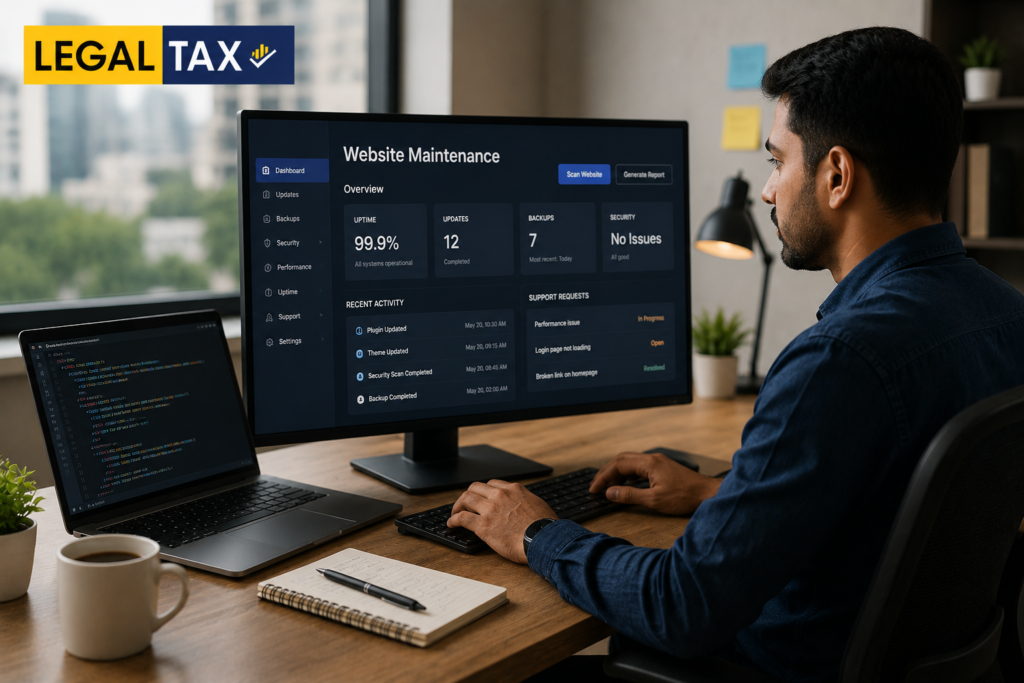
Website maintenance is not a single service — it is a collection of services, each with a different frequency, technical complexity, and business impact. A maintenance proposal that simply states “we will maintain your website for ₹X per month” without specifying what is included is not a useful proposal. The following is a category-by-category breakdown of what a comprehensive maintenance engagement covers.
Category 1: Software Updates
Software updates are the highest-frequency and most security-critical maintenance task for CMS-based websites.
CMS Core Updates
📋 WordPress, Joomla, Drupal, and other open-source CMSes release regular updates — some are security patches, some are feature releases, some are both 📋 Major version updates (e.g., WordPress 6.x to 7.x) require careful testing before deployment — they may break theme or plugin compatibility 📋 Minor version and patch updates (e.g., WordPress 6.4.1 to 6.4.2) are typically safer but still require testing 📋 Best practice: Test all CMS updates on a staging copy of the site before deploying to the live site. Deploying directly to the live site without testing is a common cause of site crashes.
Plugin and Extension Updates
📋 A typical WordPress site runs 15–40 plugins. Each plugin has its own update cycle, often releasing security patches independently of the CMS core. 📋 Plugin updates must be applied regularly — but each update must be tested, because plugin updates are the most common cause of site crashes and broken functionality 📋 Outdated plugins with known vulnerabilities are the most common entry point for WordPress site hacks 📋 Best practice: Update plugins on a staging environment first; verify functionality after each update; then deploy to live
Theme Updates
📋 Premium themes and page builder plugins (Elementor, Divi, WPBakery) release regular updates 📋 Theme updates can affect the visual layout of the site — thorough visual testing after theme updates is essential
PHP Version Updates
📋 Web hosts periodically sunset support for old PHP versions. Sites still running on PHP 7.x when the host moves to PHP 8.x may have compatibility issues 📋 PHP version compatibility must be verified before forcing a version upgrade — some plugins and themes are not yet PHP 8.x compatible 📋 Proactive PHP version management prevents the forced-upgrade crisis
Category 2: Security Monitoring and Hardening
Beyond software updates, a maintenance engagement should include active security monitoring and configuration hardening.
Malware Scanning
📋 Regular automated scans of the site’s files and database for known malware signatures, injected code, and suspicious file modifications 📋 Tools used: Wordfence, Sucuri SiteCheck, iThemes Security, or server-level scanning through the hosting control panel 📋 Frequency: Daily automated scans; immediate alerting when a threat is detected
Security Hardening
📋 Ensuring that WordPress admin login URL is not at the default /wp-admin/ (which bots specifically target) 📋 Enforcing strong password policies and two-factor authentication for all admin accounts 📋 Disabling XML-RPC (a common attack vector) if not needed 📋 Implementing login attempt limits to block brute force attacks 📋 Setting correct file permissions on server files 📋 Removing inactive plugins and themes (which still represent attack surfaces even if inactive) 📋 Hiding WordPress version information from the site’s source code
Web Application Firewall (WAF)
📋 A WAF filters malicious traffic before it reaches the site — blocking known attack patterns, SQL injection attempts, cross-site scripting (XSS) attacks 📋 Cloudflare (free and paid tiers), Sucuri WAF, and Wordfence firewall are commonly used 📋 WAF configuration requires technical expertise to avoid blocking legitimate traffic
SSL Certificate Monitoring
📋 SSL certificates have a validity period — typically 90 days (Let’s Encrypt) or 1–2 years (paid certificates) 📋 An expired SSL certificate causes browsers to display a security warning to every visitor (“Your connection is not private”), immediately destroying visitor trust and traffic 📋 Automated SSL renewal should be configured — but the renewal process occasionally fails and must be monitored 📋 Best practice: Monitor SSL certificate expiry and have a verified renewal process that is tested before the certificate expires
Category 3: Performance Monitoring and Optimisation
Uptime Monitoring
📋 The site must be monitored continuously for downtime — server failures, database errors, hosting infrastructure issues 📋 Uptime monitoring tools (UptimeRobot, Pingdom, Site24x7) check the site at regular intervals (every 1–5 minutes) and send alerts when the site is not responding 📋 What to look for in a maintenance contract: What is the SLA response time when an outage is detected? Who is responsible for resolving it? Is there 24/7 monitoring?
Page Speed and Core Web Vitals Monitoring
📋 Google’s Core Web Vitals (LCP, INP, CLS) are ranking factors — deterioration in these scores can affect search rankings 📋 Regular performance audits using Google PageSpeed Insights, GTmetrix, or Lighthouse catch performance regressions before they impact rankings 📋 Performance maintenance tasks: — Image optimisation (compressing new uploads; converting to modern formats like WebP) — Database optimisation (clearing post revisions, transients, spam comments that accumulate in the database) — Caching configuration review (ensuring the caching plugin is correctly configured and cache is being served) — CDN (Content Delivery Network) monitoring
Database Maintenance
📋 WordPress and other CMSes accumulate database bloat over time — post revisions, trashed posts, spam comments, expired transients, orphaned metadata 📋 Regular database cleaning and optimisation reduces database size, improves query performance, and reduces server resource consumption 📋 Database optimisation should be run monthly, not annually
Category 4: Backup Management
Backups are the safety net that makes everything else recoverable. A site without verified, recent backups is a site where a single incident — a hack, a failed update, a server failure — can result in total data loss.
What a proper backup regime includes:
📋 Full site backups: The complete website — files and database — backed up as a unit 📋 Frequency: Daily backups for active sites with regular content updates; weekly backups for less active sites at minimum 📋 Offsite storage: Backups must be stored in a location separate from the hosting server — if the server fails catastrophically, the backup on the same server is also lost. Backups should be stored in cloud storage (Google Drive, Dropbox, Amazon S3, or a dedicated backup service). 📋 Retention: Multiple backup points should be retained — not just the most recent backup. A hack that was introduced two weeks ago may corrupt backups from the past two weeks. Retaining 30 days of daily backups provides meaningful protection. 📋 Backup verification: A backup that cannot be restored is not a backup. Backup files should be verified periodically — a test restore on a staging environment confirms that the backup is complete and restorable.
What to look for in a maintenance contract:
📋 Backup frequency and storage location 📋 Retention period 📋 Whether backup restoration is included (some providers charge separately for restoring from backup) 📋 Whether restoration testing is included
Category 5: Content Updates
Content maintenance covers the changes to the site’s visible content — adding new pages, updating existing text, uploading new images, publishing blog posts, updating product information, changing prices.
This is typically the maintenance service that clients think about first — but it is actually the least technically complex aspect of maintenance, and the most variable in scope.
What is typically included:
📋 Text changes on existing pages 📋 Image replacements and additions 📋 Adding new pages (up to a defined scope per month) 📋 Blog post publishing (for sites with active content programmes) 📋 Product updates for e-commerce sites — price changes, stock status updates, new product additions 📋 Navigation menu updates 📋 Form updates (contact forms, enquiry forms)
What is typically charged separately:
📋 New feature development — adding functionality that did not exist before 📋 Significant new content creation (copywriting, photography, video production) 📋 Design changes to page layouts 📋 New landing page design and build 📋 Structural changes to navigation or site architecture
Defining “content updates” in the contract:
The scope of content updates in a maintenance contract must be specified clearly — in terms of hours per month, or specific types of tasks, or both. A contract that includes “unlimited content updates” without any scope definition is either very expensive or a promise that will not be kept.
Category 6: Technical Monitoring and Issue Resolution
Beyond software updates and security, maintenance includes ongoing technical monitoring and resolution of issues as they arise.
📋 Broken link monitoring: Internal and external links break over time as pages are moved, deleted, or external sites change their URL structures. Broken links (404 errors) negatively affect user experience and SEO. Regular broken link scanning and fixing is a maintenance task. 📋 Form testing: Contact forms, enquiry forms, and booking forms should be tested regularly — forms frequently break when email configurations change, when CAPTCHAs expire, or when plugin updates affect form functionality. 📋 Analytics and tracking verification: Google Analytics 4 tracking, conversion tracking, and Google Tag Manager configurations should be verified regularly — tracking breaks more often than most businesses realise, resulting in data gaps. 📋 Search Console monitoring: Google Search Console reports crawl errors, manual actions, Core Web Vitals issues, and security warnings. Regular Search Console monitoring catches issues that affect search visibility. 📋 Browser and device compatibility: As browsers update, occasional rendering issues appear. Regular cross-browser testing catches these before users encounter them.
Category 7: Domain and Hosting Management
📋 Domain renewal: Domain names have annual (or multi-year) renewal dates. A domain that is not renewed expires — and is potentially registered by a domain squatter, requiring expensive recovery or a domain name change. Domain renewal monitoring is a basic but critical task. 📋 Hosting account monitoring: Hosting plans have resource limits. As the site grows (more content, more traffic, more database records), hosting resources can be exhausted — causing slow performance or downtime. Monitoring hosting resource utilisation and planning capacity upgrades is a proactive maintenance responsibility. 📋 Email deliverability: For business websites with contact forms or transaction email (order confirmations, booking confirmations), email deliverability is a maintenance concern — ensuring that SPF, DKIM, and DMARC records are correctly configured, and that the domain is not blacklisted.
What Website Maintenance Costs in India
Pricing for website maintenance services in India varies significantly based on the size and complexity of the site, the platform, the scope of services, and the type of provider. The ranges below are indicative for 2026 and cover the full market from budget providers to professional agencies.
Small Business Website (WordPress, 5–30 pages, moderate traffic)
Basic maintenance — software updates + backup + uptime monitoring: 📋 ₹2,000 – ₹5,000/month
Standard maintenance — the above + security monitoring + performance monitoring + 2–4 hours content updates: 📋 ₹5,000 – ₹12,000/month
Comprehensive maintenance — the above + malware scanning + broken link monitoring + Core Web Vitals monitoring + Search Console monitoring + analytics verification + 4–6 hours content updates: 📋 ₹12,000 – ₹25,000/month
Medium Business or Corporate Website (WordPress or custom CMS, 30–150 pages, significant traffic)
Standard maintenance: 📋 ₹12,000 – ₹30,000/month
Comprehensive maintenance with priority support SLA: 📋 ₹25,000 – ₹60,000/month
E-Commerce Website (WooCommerce or Shopify, 50–5,000 products)
Standard maintenance — updates + security + backup + performance: 📋 ₹10,000 – ₹25,000/month
Comprehensive maintenance including product updates, order management support, payment gateway monitoring: 📋 ₹25,000 – ₹60,000/month
High-volume e-commerce (large catalogue, significant daily order volume): 📋 ₹60,000 – ₹2,00,000+/month
Custom-Built Websites (on Laravel, Django, Node.js, or other frameworks)
Custom-built sites require developers with specific knowledge of the custom codebase — this eliminates the low-cost option of a generic WordPress maintenance provider. Maintenance for custom sites typically involves:
📋 Framework and dependency version management 📋 Security patching of the application code 📋 Server and infrastructure management 📋 Performance monitoring and optimisation
📋 Monthly cost for a mid-size custom site: ₹20,000 – ₹80,000/month — depending on the complexity of the codebase and the level of support required
Shopify-Specific Maintenance
Shopify’s hosted model reduces some maintenance burden (Shopify manages the hosting infrastructure, applies platform updates) but does not eliminate it entirely:
📋 App updates and compatibility management 📋 Theme updates 📋 Performance monitoring 📋 Custom code maintenance 📋 Content updates and product management
📋 Shopify maintenance (basic to standard): ₹5,000 – ₹20,000/month
Hourly and Ad Hoc Maintenance
For businesses that prefer not to commit to a monthly retainer, ad hoc maintenance is available at hourly rates:
📋 Junior developer / content manager: ₹500 – ₹1,500/hour 📋 Mid-level developer: ₹1,500 – ₹3,000/hour 📋 Senior developer / technical specialist: ₹3,000 – ₹8,000/hour
Ad hoc maintenance is suitable for sites with minimal technical requirements and infrequent updates. For any site that is commercially important — generating leads, revenue, or significant traffic — a retainer with defined SLAs is preferable to ad hoc availability.
What Is Typically Not Included in Standard Maintenance Contracts
Understanding what is excluded from maintenance pricing avoids surprises:
📋 New feature development — building functionality that does not currently exist. This is development work, not maintenance, and is typically quoted separately. 📋 Content creation — copywriting, photography, video production. Uploading and publishing content is maintenance; creating the content is not. 📋 Major design changes — redesigning pages or sections. Maintenance keeps the existing design functional; changing the design is a development task. 📋 Emergency recovery from a hack or data loss event — some contracts include this; most basic contracts exclude it or treat it as a separate billable event. Verify explicitly. 📋 SEO content strategy and execution — creating content for organic search growth is a separate service from maintaining existing SEO configurations. 📋 Third-party service costs — domain registration fees, premium plugin subscription renewals, CDN costs, hosting costs. Maintenance contracts typically cover the labour of management but pass through the direct costs of third-party services.
How to Evaluate a Website Maintenance Proposal
A maintenance proposal from an agency or freelancer should be evaluated against a specific set of criteria. Here is what to look for:
Specificity of Scope
📋 Does the proposal specify exactly which tasks are performed, at what frequency? “We will maintain your website” is not a scope — it is a promise without definition. 📋 Are content update hours defined? Is there a monthly cap? 📋 Are software updates defined — does “updates” include CMS core, all plugins, and themes? Or only some of these?
SLA (Service Level Agreement) for Support and Uptime Response
📋 What is the response time commitment for different types of issues? Distinguish between: — Critical issues (site down, security breach, broken checkout): response within 1–4 hours — High priority (significant functionality broken): response within 4–24 hours — Standard requests (content updates, minor issues): response within 1–3 business days 📋 Is support available outside business hours for critical issues? Many small Indian agencies provide business-hours support only — which means a site that goes down on Saturday evening may not be looked at until Monday morning. 📋 What constitutes “response” — acknowledgement of the issue, or active resolution? Clarify.
Backup Policy Details
📋 What is backed up, at what frequency, to what location? 📋 What is the retention period? 📋 Is restoration included, or charged separately? 📋 Has the restoration process been tested?
Security Monitoring Specifics
📋 What tools are used for malware scanning? 📋 What is the alerting process when a threat is detected? 📋 Who is responsible for remediation, and at what cost?
Reporting
📋 Does the agency provide a monthly report of maintenance activity — what updates were applied, what issues were found and resolved, uptime statistics, performance metrics? 📋 Monthly reporting is a hallmark of a professional maintenance engagement. An agency that cannot account for what it has done each month is an agency that may not have done much.
Staging Environment for Updates
📋 Does the agency test updates on a staging copy of the site before applying to live? This is the correct practice — but many budget providers apply updates directly to the live site. 📋 Ask specifically: “Do you test plugin updates on a staging environment before deploying to the live site?” If the answer is no, the updates are being applied at the risk of the live site.
Different Provider Types: Who Should You Hire?
The Indian market for website maintenance services is served by several different types of providers, each with different strengths, weaknesses, and appropriate use cases.
The Original Development Agency
The agency that built the site knows the codebase, the hosting setup, and the decisions made during development. This familiarity has real value — especially for custom-built sites or heavily customised WordPress builds.
Advantages: Deep familiarity with the specific site; continuity of relationship; able to handle development work alongside maintenance.
Disadvantages: May not have dedicated maintenance focus (maintenance may be handled by junior staff while the senior team is on new projects); may be expensive for routine maintenance tasks; may not have proactive monitoring infrastructure if maintenance was not their primary service.
Best for: Custom-built sites; complex WordPress installations with significant custom development.
Specialist Maintenance Providers
Agencies that focus specifically on website maintenance — with monitoring infrastructure, standardised processes, and dedicated support teams.
Advantages: Maintenance is their core competency; standardised processes mean nothing is missed; dedicated monitoring tools; clear SLAs.
Disadvantages: May not be equipped to handle significant development work (new features, redesigns); less familiar with the specific site initially.
Best for: Standard WordPress and WooCommerce sites; businesses that need reliable, predictable maintenance without ongoing development.
Freelance Developers
Individual developers on a retainer or ad hoc basis.
Advantages: Lower cost; direct relationship; flexible scope.
Disadvantages: Single point of failure — if the freelancer is unavailable (illness, vacation, other projects), maintenance stops; no dedicated monitoring infrastructure; limited capacity for emergency response; no organisational continuity if the freelancer stops working.
Best for: Very small sites with minimal traffic and low commercial stakes; businesses with strong in-house technical awareness who can supervise the work.
Hosting Provider’s Managed Services
Some Indian web hosting providers (BigRock, Hostinger India, SiteGround, WP Engine) offer managed WordPress or managed hosting plans that include some maintenance services — automatic WordPress updates, daily backups, security monitoring, performance optimisation.
Advantages: Integrated with hosting; cost-effective for basic maintenance; no additional vendor relationship.
Disadvantages: Limited to the hosting provider’s platform and tools; typically does not include content updates or custom issue resolution; support quality varies.
Best for: Very small sites where the primary need is security updates and backups; businesses on a tight budget.
Red Flags in Maintenance Contracts
Several patterns in maintenance proposals and contracts should give a business owner pause.
“Unlimited updates” without a scope definition Unlimited is a promise that cannot be kept indefinitely. Either the scope of “updates” is so narrow that it will rarely be called upon (making it effectively meaningless), or the provider will eventually dispute what counts as an update and what counts as billable development work. Get the scope defined in terms of hours per month or specific task types.
No mention of staging environments A maintenance provider that applies all updates directly to the live site is a maintenance provider that will eventually cause a live site crash. The cost of one crash — in downtime, in emergency recovery, in lost business — can exceed the annual maintenance fee.
No SLA for critical issues A maintenance contract with no defined response time for critical issues (site down, security breach) is a contract that will not perform when it most matters. Get the critical issue response time in writing.
No backup policy specification “We take backups” without specifying frequency, storage location, retention period, and restoration policy is not a backup policy — it is a liability shield. Get the specifics.
Lock-in without exit provisions Some maintenance contracts include provisions that make it difficult or expensive to leave — access to the hosting account, the domain, the codebase, or the admin credentials is controlled by the provider. Ensure that the contract specifies that all access credentials are in the client’s ownership and that they can be transferred to a new provider without the outgoing provider’s cooperation being required.
Price that seems too low for the scope described A comprehensive maintenance package for a WordPress site covering security monitoring, daily backups, all software updates, malware scanning, uptime monitoring, and four hours of content updates per month cannot realistically be delivered for ₹2,000/month. A price significantly below the market rate for the described scope means either the scope will not be delivered or the provider is not financially sustainable.
The In-House vs Outsourced Maintenance Decision
For businesses above a certain size — typically those with more than one commercial website, or with websites that are primary revenue generators — the question of whether to outsource maintenance or manage it in-house deserves explicit consideration.
In-house maintenance makes sense when: 📋 The business has an in-house developer or technical team 📋 The website is large enough and important enough to justify a dedicated technical resource 📋 The pace of feature development and content updates requires daily developer involvement anyway 📋 Security and data sensitivity requirements are high enough that third-party access is a concern
Outsourced maintenance makes sense when: 📋 The business does not have in-house technical capability 📋 The website’s technical maintenance volume does not justify a full-time or even part-time employee 📋 Predictable monthly costs are preferred to variable in-house salary costs 📋 The business wants access to a team with broader skills (security specialists, performance specialists) rather than a single generalist
For most small and medium Indian businesses, outsourced maintenance is the more practical choice — the volume of maintenance work rarely justifies a dedicated in-house hire, and the cost of getting it wrong (through neglect or through untrained in-house management) typically exceeds the cost of a professional maintenance engagement.
Building a Website Maintenance Checklist
For businesses evaluating their current maintenance situation or reviewing a maintenance proposal, the following checklist covers the minimum that should be addressed.
Monthly Tasks
📋 CMS core and plugin updates (tested on staging, then deployed to live) 📋 Theme updates (with visual verification after update) 📋 Security scan results reviewed 📋 Uptime statistics reviewed 📋 Database optimisation run 📋 Backup integrity verified (at least spot check) 📋 Broken links scan and fix 📋 Form testing (all contact and enquiry forms) 📋 Google Search Console checked for errors and warnings 📋 Analytics tracking verified
Quarterly Tasks
📋 Core Web Vitals performance audit 📋 Comprehensive cross-browser and cross-device testing 📋 Full backup restoration test on staging 📋 PHP version compatibility check 📋 Hosting resource utilisation review 📋 SSL certificate status check (with renewal if <60 days remaining) 📋 Security hardening configuration review
Annual Tasks
📋 Domain renewal confirmation (if not on auto-renewal) 📋 Full security audit 📋 Full performance audit and optimisation 📋 Third-party service and plugin audit — remove unused plugins and services 📋 Review of maintenance scope against current site requirements
Frequently Asked Questions
1. What are website maintenance services?
Website maintenance services involve the regular monitoring, updating, and management of a website to ensure it remains secure, functional, fast, and up to date. These services help prevent technical issues and maintain a positive user experience.
2. What is typically included in a website maintenance package?
Most website maintenance plans include software updates, security monitoring, website backups, bug fixes, performance optimization, content updates, uptime monitoring, and technical support. The exact scope depends on the service provider and the website’s complexity.
3. How much do website maintenance services cost in India?
The cost varies based on the type and size of the website. Basic maintenance plans for small business websites are generally affordable, while e-commerce platforms, custom applications, and high-traffic websites typically require more comprehensive and higher-priced support packages.
4. Is website maintenance necessary if my website is already live?
Yes. Even after launch, websites require ongoing maintenance to address security vulnerabilities, keep software updated, improve performance, and ensure compatibility with changing technologies and browsers.
5. How do I choose the right website maintenance service provider in India?
Look for a provider with experience in your website platform, clear service-level commitments, responsive support, transparent pricing, and a proven track record of handling updates, security, and performance optimization effectively.
Conclusion
Website maintenance is not a luxury or an optional add-on for businesses that can afford it. It is a basic operational responsibility for any business that has a website it depends upon commercially. The alternative to professional maintenance is not free maintenance — it is deferred maintenance that accumulates as technical debt, security risk, and performance degradation, until it manifests as an expensive emergency.
The investment in professional maintenance is predictable, budget-able, and modest relative to the cost of the website itself and the commercial value the website generates. The cost of not maintaining is unpredictable, potentially catastrophic, and almost always significantly higher than the maintenance it replaces.
For Indian businesses evaluating their options: understand what comprehensive maintenance includes, verify that any proposed maintenance contract covers the technical specifics (not just content updates), get the SLA and backup policy in writing, and choose a provider whose process you can verify through activity reports.
The website works for the business every day. Maintenance is what keeps it working.
Specify the scope. Verify the process. Protect the asset.
Get Expert Support for Website Maintenance
🟡 LegalIP.in provides complete copyright registration support for authors, musicians, filmmakers, software developers, designers, and businesses across all content categories in India.
🟡 Visit 👉business24hub to explore more on this.
👉 Copyright Registration at LegalIP.in 👉 Trademark Registration at LegalIP.in 👉 Patent Registration at LegalIP.in 👉 Design Registration at LegalIP.in
🟡 Also Need Business Registration? 👉 Private Limited Company Registration — LegalTax.in 👉 LLP Registration — LegalTax.in 👉 GST Registration and Filing — LegalTax.in 👉 MSME Registration — LegalTax.in
📞 Call Now: +91 9711939395 🕐 Free Consultation: Monday to Saturday, 9 AM to 6 PM

Adv. Manish Kashyap is an IPR Law Expert with 10+ years of professional experience in Intellectual Property Rights. He specializes in matters related to Trademark, Copyright, Patent, and other IPR-related legal services, helping individuals and businesses protect and manage their intellectual property effectively.
Our Clients